DSfix 2.0.1

With 2.0 yesterday I introduced an issue with the HUD modifications. I fixed it now. That’s all that has changed.

People are also reporting some stability problems and physics issues since the patch, but I’m not sure those are related to DSfix. On the bright side, it seems like in addition to fixing the stereo downmix, the patch also somewhat reduced the CPU load of the game.

As always, consider donating if you like the mod.

Get DSfix 2.0.1 here.

DSfix 2.0

Dark Souls was updated today, fixing the audio downmixing bug that had been present since launch (and maybe more?). Unfortunately, it also broke some features of DSfix, most significantly the FPS unlocking.

Well, with a lot of help from Clément Barnier, here is version 2.0 of DSfix which resolves these issues and adds a small new feature.

Changes:

  • Updated the framerate unlock feature to work with the patched version of the game (Nwks)
  • Updated post-processing AA to work with the patched version of the game
  • Fixed an issue where hudless screenshots would sometimes not correctly capture some effects
  • Added “presentWidth” and “presentHeight” to the .ini for full control over (windowed) downsampling. For example, if you want to downsample from 2560×1440 to 1080p, you would use renderWidth 2560, renderHeight 1440, presentWidth 1920 and presentHeight 1080. If none of that makes sense to you just leave these values at 0 ;)

I hope this allows you to enjoy Dark Souls in its full glory again. Happy holidays!

As always, consider donating if you like the mod.

Get DSfix 2.0 here.

It’s 4 am here now so if I messed up anything in this release it will have to wait until tomorrow.

DSfix 1.9

I got the first external code patch for DSfix this week! I hope it’s a sign of more to come.

Changes:

  • Added 2 new ambient occlusion algorithms: HBAO and SCAO. However, the existing VSSAO is still the best option in terms of visuals/performance.
  • Added a scale option for ambient occlusion on lower-end systems. Also useful if you want to downscale from a high resolution but not compute the SSAO at that resolution. This option works for all AO algorithms.
  • Disabled hotkeys when Dark Souls is not active. Previously, you could e.g. toggle the frame rate limit or take screenshots inadvertently when DS was not the active window.
  • Reinstated the texture filtering option with slightly better implementation.
  • Small bug fixes in frame rate limits calculation.
  • Rework WindowManager::resize to center the window along with resizing, and call on startup. Also fix small style issue with the borderless fullscreen toggle (wT)

The AO changes are rather big, the rest are small things that people have been asking for or that I wanted to do for a while.

As always, consider donating if you like the mod.

Get DSfix 1.9 at the Dark Souls nexus.
(alternative download location)

DSFix 1.8

It has been quite a while — I’ve been very busy at work for the past 3 weeks. I also haven’t had time to check/approve blog comments, so now there are 3700 in the moderation queue, and I’m sure at least 98% of those are spam. Sorry if you got stuck there!

Changes:

  • Added an FXAA option in addition to SMAA. FXAA is blurrier, but also deals with sub-pixel aliasing better because of that. It’s also very slightly cheaper in terms of performance.
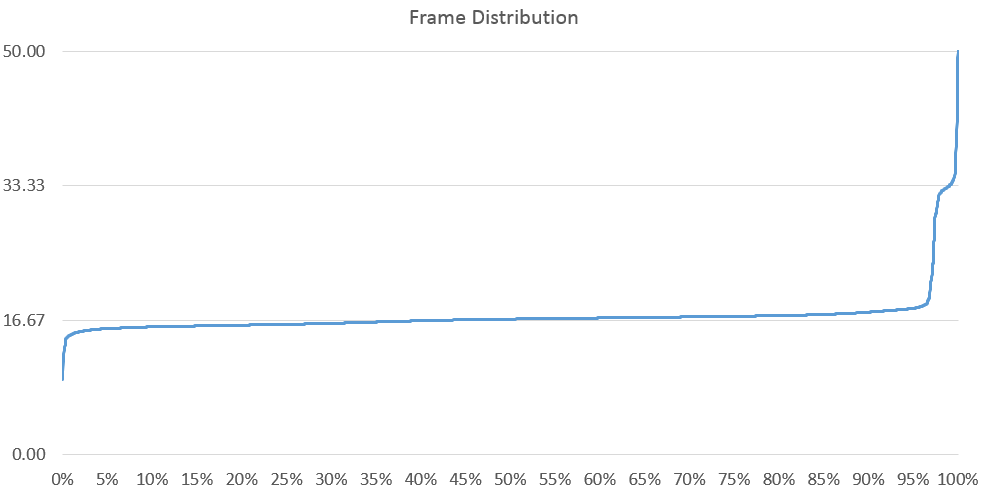
  • Added the ability to bind a key to toggle a 30 FPS limit for a short time. By default it’s bound to backspace. This is useful to fix issues with the FPS unlock, see below.
  • Greatly improved depth usage in the SSAO shader. This means that the SSAO effect is now more stable at different distances from objects.

As always, consider donating if you like the mod.

Get DSfix 1.8 at the Dark Souls nexus.
(alternative download location)

In other news, I believe that all the possible issues with the FPS unlock are now known, and there is a way to deal with most of them as of version 1.8:

  • Sliding down ladders can make you fall through the ground. Workaround: don’t slide down ladders with unlocked FPS.
  • Jumping/rolling distance is slightly reduced at 60 FPS. Workaround: in case you need to do one of the 2 or 3 jumps in the game that need maximum distance, use the new toggle key to toggle a 30 FPS limit for the jump, then toggle back to 60 after it.
  • Slope interactions are slightly different at 60 FPS compared to 30, which may make you “stuck” at small obstructions from time to time. Workaround: rolling if there is space, walking back and forth a bit if there is not. Toggling the 30 FPS lock for a second in the worst case.

I have been playing for 40 hours or so with unlocked framerate, in single-player, coop and pvp, and I had no other issues.

In conclusion, I hope everyone had a nice couple of weeks and backed Project Eternity!

DSfix 1.7

And one more for the road.

Changes:

  • Re-implemented the FPS limiter. It’s quite exact now and also performed at a better point in time (before presenting the frame)
  • Made frame period calculation (for animation) slightly more exact
  • Added FPS thresholding for SMAA. What this means is that you can supply a value – say 45 FPS – and if the game is in danger of dropping below that, SMAA will be disabled. It will be re-enabled once the framerate is safely above the threshold again.

As always, consider donating if you like the mod.

Get DSfix 1.7 at the Dark Souls nexus.
(alternative download location)

DSfix 1.5

It’s been a while, but I just released a new version of DSfix!

Bugfixes:

  • Fixed an issue with SSAO being rendered on top of particle effects/fog/water, instead of below them.
  • Improved the method used to determine when in the render pipeline to apply SMAA/SSAO, and also included more robust renderstate management. (This may fix the random display corruption issue people have been sporadically reporting ever since SMAA was included)
  • Tweaked the SSAO parameters a bit

New features:

  • As many modders requested, you can now load .dds texture overrides in addition to .png
  • It is now possible to set the desired target FPS of the game in the .ini, thanks to Nwks (Clément Barnier)! (This is fully integrated and also works correctly together with the intro skip feature)

Regarding the FPS override feature, please carefully read the notes in the .ini
This is the most invasive feature of DSfix, and thus carries the highest risk.

I am well aware that there are still many issues remaining with the minimal HuD, and since it seems like no one is fixing them I will get back to it at some point.

As for the performance requirements of 60 FPS, personally (after disabling all power management options for my GPU and CPU) I can mostly maintain 60 FPS at 1080p, 810 DoF with DoF blur 1, SMAA 4 and SSAO 2. This is on an i7 920 at 3.6 GHz and a 660ti.

As always, consider donating if you like the mod.

Get DSfix 1.5 at the Dark Souls nexus.

Dark Souls Nexus & DSfix progress

There is now a Nexus site for Dark Souls mods available:
http://darksouls.nexusmods.com/

I know some people were asking for this, and it should make keeping track of new mods, changes and updates easier. It also offers far better options for discussion (e.g. an actual forum) than the comments in these blog posts, which get unwieldy once there are more than a dozen replies or so. I will publish future updates of DSfix there (though I’ll still keep making posts here as well), and I would encourage everyone to use it for downloads and discussion.

As for progress in DSfix, I just fixed the issue whereby SSAO was rendered on top of particles, fog, and water instead of below them (easiest to see when activating bonfires). This should also fix the sporadic screen corruption some people reported when either SSAO or SMAA are active in particular areas of the game. It’s in gitHub for now, I’ll do a release this weekend.

I haven’t received any direct source contributions or pull requests so far, but quite a few people seem to be interested in the repository, so we will see how that develops.


DSfix source release

I just put DSfix up on github.

It’s not nearly as cleaned up as I wanted it to be, but I thought it’s time to put it out there and see what people come up with. Have fun!

Please try to only use the comments on this blog post for development related questions!

Here’s the developer readme:

And here’s my current TODO file:
(I’ve been keeping this since 0.8 or so, lines starting with // are done)


DSfix 1.4

As I announced previously, I’m now focusing purely on bug fixes until the source code release, which will probably coincide with 1.5.

  • Textures with a hash code starting with 0 will now be correctly named when dumped  and loaded when overriden (with prefix 0s). Every hash is 8 charaters long.
  • Fixed the cause of the latest fullscreen alt-tab crash (hopefully).
  • Fixed modified HUD performance, particularly in conjunction with SMAA and VSSAO.
    The performance impact should now be negligible.
  • Fixed modified HUD not showing effects like poison or bleeding correctly.

Known issues with the modified HUD: boss health bars, subtitles, damage numbers and curses. Configure the HUD modification toggle key to turn it off if you get into a boss fight or another situation where it messes up.

As always, consider donating if you like the mod.

DSfix version 1.4 download
(alternative download)

Please please remember to read the README.txt!